Finding the perfect monitor for home entertainment can feel overwhelming with countless options flooding the market. The BenQ EW2790Q stands out as a compelling choice for anyone seeking an exceptional viewing experience without breaking the bank. This 27-inch display combines impressive visual quality with thoughtful features designed specifically for entertainment enthusiasts.
Whether you’re binge-watching your favorite series, enjoying blockbuster movies, or diving into casual gaming sessions, this monitor promises to elevate your experience. Let’s explore what makes the EW2790Q such a noteworthy option for your home setup.
Design Philosophy: Aesthetics Meet Functionality
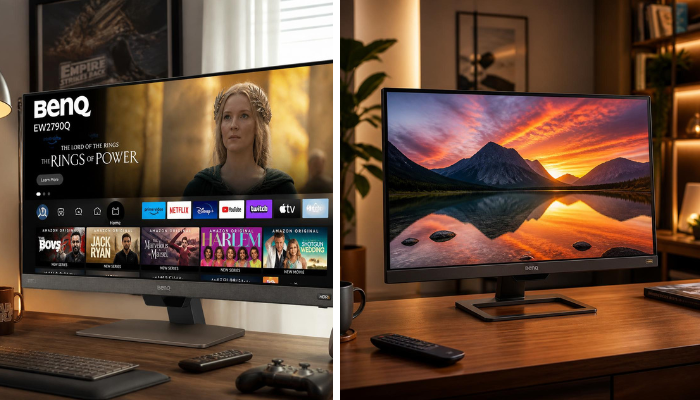
The BenQ EW2790Q showcases a minimalist design that complements modern living spaces beautifully. The nearly bezel-less display creates an immersive viewing experience by minimizing distractions around the screen edges. This clean aesthetic approach means the monitor blends seamlessly into your entertainment area without demanding attention.
The stand features a simple yet sturdy construction with a subtle metallic finish. It’s not flashy or ostentatious, which many users appreciate when trying to maintain a sophisticated room atmosphere. The slim profile means you won’t need excessive desk space, making it ideal for apartment dwellers or anyone working with limited square footage.
Cable management has been thoughtfully considered as well. The monitor includes routing channels that help keep your setup tidy and organized. Nothing ruins a beautiful entertainment space quite like tangled cables snaking everywhere, so this attention to detail deserves recognition.
Display Quality: Where Entertainment Comes Alive
At the heart of any entertainment monitor lies its display technology, and the EW2790Q doesn’t disappoint. Featuring a 27-inch IPS panel with QHD resolution (2560 x 1440 pixels), this screen delivers sharp, detailed images that bring content to life.
The increased pixel density compared to standard Full HD displays means you’ll notice finer details in movies, shows, and games. Textures appear more realistic, text remains crisp even at smaller sizes, and overall image clarity receives a significant boost. This resolution sweet spot provides noticeably better quality without requiring the processing power that 4K demands.
Color reproduction stands as another strength of this monitor. The IPS technology ensures wide viewing angles, so colors remain consistent whether you’re sitting directly in front of the screen or watching from the side during movie night with friends. The display covers 99% of the sRGB color space, delivering vibrant yet accurate colors that make entertainment content pop without appearing oversaturated or artificial.
Brightness levels reach up to 300 nits, providing adequate luminosity for most viewing environments. While it won’t compete with HDR displays in peak brightness, it performs admirably in typical home settings with controlled lighting.
Eye Comfort Technology: Watch Longer Without Strain
BenQ has built a strong reputation around eye care technology, and the EW2790Q incorporates several features designed to reduce visual fatigue during extended viewing sessions.
The Brightness Intelligence technology automatically adjusts screen brightness based on ambient lighting conditions. This intelligent system considers both the content displayed and your room’s lighting, creating optimal viewing conditions without manual intervention. You’ll appreciate this feature during movie marathons when room lighting changes throughout the day.
Flicker-free technology eliminates screen flickering that can cause eye strain, even though you might not consciously notice it. Traditional monitors adjust brightness through rapid flickering, which can lead to headaches and fatigue during long viewing periods. The EW2790Q uses DC backlighting to provide consistent, stable illumination.
Low Blue Light technology offers multiple modes to reduce harmful blue light emission. Excessive blue light exposure, especially during evening hours, can disrupt sleep patterns and cause digital eye strain. You can select from various filtering levels depending on your sensitivity and the time of day.
These combined eye care features make the EW2790Q particularly appealing for anyone who spends significant time in front of screens. Whether you’re working from home during the day and streaming entertainment at night, your eyes will thank you.
Audio Performance: Built-In Sound That Surprises
Many monitors include speakers as an afterthought, delivering tinny audio that forces users to invest in external solutions immediately. The EW2790Q takes a different approach with its 2-watt stereo speakers featuring BenQ’s proprietary audio technology.
While these built-in speakers won’t replace a dedicated sound system or quality headphones, they perform surprisingly well for casual viewing. The audio output remains clear at moderate volumes with decent tonal balance. You can comfortably watch YouTube videos, catch up on news, or enjoy lighter entertainment without reaching for headphones.
For serious movie watching or gaming, you’ll likely want to upgrade to external speakers or a soundbar. However, having respectable built-in audio means you have flexibility depending on your activity and environment. Late-night viewing when you can’t use loud speakers becomes more enjoyable with decent internal audio.
The monitor includes a headphone jack positioned conveniently for easy access. This thoughtful placement means you won’t fumble around the back panel when you want to switch to private listening.
Gaming Capabilities: More Than Just Movies
Although marketed primarily as an entertainment monitor, the EW2790Q handles casual to moderate gaming quite capably. The QHD resolution provides excellent visual clarity in game environments, making details easier to spot and enhancing overall immersion.
The monitor features a 75Hz refresh rate, which offers smoother motion compared to standard 60Hz displays. While competitive esports gamers will demand higher refresh rates, this specification works perfectly for single-player adventures, strategy games, and casual multiplayer experiences. The difference becomes noticeable when panning cameras or during action sequences.
AMD FreeSync technology helps eliminate screen tearing and stuttering by synchronizing the monitor’s refresh rate with your graphics card’s output. This feature creates smoother gameplay, particularly important during fast-moving scenes where tearing would otherwise prove distracting.
Response time sits at a reasonable level for an IPS panel optimized for entertainment rather than competitive gaming. You won’t experience the lightning-fast response of TN gaming panels, but for most gaming scenarios outside professional competition, performance remains satisfactory.
Picture-in-Picture and Picture-by-Picture modes add versatility to your gaming sessions. You could monitor a streaming chat while gaming or reference a walkthrough guide without alt-tabbing away from your game.
Connectivity Options: Versatile and Future-Ready
The EW2790Q provides a solid selection of connectivity options to accommodate various devices and use cases. The monitor includes HDMI 2.0 ports, which support the QHD resolution at 75Hz without issues. This means you can connect gaming consoles, streaming devices, or computers without compatibility concerns.
A DisplayPort input offers an additional connection method preferred by many PC users. DisplayPort often provides slightly better performance characteristics and is commonly found on modern graphics cards.
USB-C connectivity represents the most forward-thinking inclusion on this monitor. This versatile port allows video input, data transfer, and power delivery through a single cable. You can connect compatible laptops and charge them simultaneously while enjoying the large display. This feature proves incredibly convenient for professionals who work on laptops during the day and want seamless entertainment transitions in the evening.
The USB-C port supports up to 65 watts of power delivery, sufficient for most ultrabooks and many standard laptops. This single-cable solution reduces desk clutter dramatically compared to traditional setups requiring separate power adapters and video cables.
Additional USB ports allow you to connect peripherals directly to the monitor, creating a functional hub setup. This arrangement keeps your workspace organized and provides easy access for flash drives or other accessories.
Smart Features: Convenience at Your Fingertips
BenQ has equipped the EW2790Q with several intelligent features that enhance daily usability. The Eye Reminder function periodically suggests breaks during extended viewing sessions. While you can dismiss these notifications, having the reminder helps establish healthier viewing habits.
Multiple viewing modes optimize the display for different content types. Cinema mode enhances contrast and color saturation for movie watching. Game mode adjusts settings to improve visibility in dark scenes and enhance response characteristics. Reading mode applies filtering and adjusts contrast to make text easier on your eyes during extended reading sessions.
You can switch between these modes quickly using the monitor’s controls, allowing you to optimize your experience based on current activities. The monitor remembers your preferences for each mode, so you won’t need to reconfigure settings repeatedly.
The on-screen display interface provides intuitive navigation through all settings and features. BenQ has refined this system across many monitor generations, resulting in a user-friendly experience that doesn’t require consulting the manual for basic adjustments.
Practical Considerations: What You Should Know
The EW2790Q’s stand offers tilt adjustment, allowing you to find a comfortable viewing angle. However, it lacks height adjustment, swivel, and pivot capabilities. This limitation might prove restrictive for some users who prefer extensive ergonomic flexibility. Third-party monitor arms represent a solution if you need additional positioning options, thanks to the standard VESA mounting compatibility.
Power consumption remains reasonable for a 27-inch QHD display. The monitor draws modest power during typical operation, and the automatic brightness adjustment helps optimize energy usage based on viewing conditions. Standby power consumption drops to minimal levels, reflecting decent environmental consideration in the design.
The monitor’s coating uses an anti-glare treatment that effectively reduces reflections without creating a grainy appearance that some matte coatings produce. You can position the monitor in rooms with windows without severe glare issues, though direct sunlight on the screen should still be avoided when possible.
Heat generation stays minimal during extended use. The monitor’s passive cooling design operates silently without fans, contributing to a peaceful entertainment environment. You won’t hear any electronic whine or fan noise that could prove distracting during quiet movie scenes.
Setup Experience: Getting Started
Unboxing and assembling the EW2790Q proves straightforward. The package includes everything needed to get started: the monitor panel, stand base and neck, power cable, HDMI cable, and quick start guide. The assembly process requires no tools and takes just minutes.
Attaching the stand involves a simple click mechanism that secures firmly without requiring screws. This tool-free approach means you can set up or pack away the monitor quickly if needed. The connection feels solid once assembled, with no wobbling during normal use.
Initial picture quality impresses right out of the box with factory settings providing a good starting point for most users. Color accuracy measures well without calibration, though enthusiasts might want to fine-tune settings to personal preferences. The various preset modes offer quick optimization for different content types if you prefer not to dive into detailed adjustments.
Connecting your devices follows standard procedures. The ports are reasonably accessible, though positioned on the back panel in a way that requires reaching around initially. Once everything is connected, you’ll rarely need to access them again unless you frequently switch between devices.
Value Proposition: Performance Meets Affordability
When evaluating any monitor, price-to-performance ratio plays a crucial role in the purchasing decision. The BenQ EW2790Q positions itself in the mid-range segment, offering features and quality that punch above its price point.
Compared to budget monitors, you receive significantly better color accuracy, eye care features, and build quality. Compared to premium displays, you sacrifice some peak brightness, advanced HDR support, and ergonomic adjustability, but save considerable money in the process.
For home entertainment purposes, this monitor delivers the features that matter most. The QHD resolution provides noticeably sharper images than Full HD. The IPS panel ensures accurate colors and wide viewing angles. The eye care technology makes extended viewing more comfortable. These core capabilities address primary user needs effectively.
The inclusion of USB-C connectivity adds significant value, particularly for laptop users who appreciate the convenience of single-cable connections. This feature alone often commands premium pricing on competitive models, making its presence here noteworthy.
Ideal Use Cases: Who Benefits Most
The EW2790Q serves several user profiles particularly well. Remote workers who spend weekdays on productivity tasks and evenings enjoying entertainment will appreciate the versatility. The monitor handles both scenarios competently without requiring you to compromise on either front.
Content consumers who prioritize visual quality for streaming services, movies, and shows find an excellent match here. The color accuracy, resolution, and screen size create an engaging viewing experience without the complexity or cost of specialized home theater displays.
Casual gamers who enjoy single-player adventures, indie titles, or strategy games will find performance more than adequate. The 75Hz refresh rate and FreeSync support enhance the experience compared to standard 60Hz monitors, while the IPS panel delivers beautiful game visuals.
Students and educators conducting remote learning benefit from the eye care features during long lecture sessions or study marathons. The clear display makes reading text comfortable, while the decent built-in speakers eliminate the need for constant headphone use.
Multi-device users who switch between laptops, desktops, and consoles appreciate the varied connectivity options. The ability to connect multiple devices simultaneously and switch between them adds convenience to daily workflows.
Potential Limitations: Being Realistic
Every product involves compromises, and understanding the EW2790Q’s limitations helps set appropriate expectations. The lack of height adjustment on the included stand might frustrate users accustomed to extensive ergonomic flexibility. Purchasing a separate monitor arm solves this issue but adds expense beyond the monitor’s cost.
Peak brightness, while adequate for most situations, doesn’t reach the levels that HDR enthusiasts expect. If you frequently watch HDR content and want the full experience with bright highlights and deep contrast, you’ll need to look at more expensive displays with dedicated HDR support.
The 75Hz refresh rate and moderate response time mean competitive gamers seeking every advantage should consider monitors specifically designed for esports. This monitor handles gaming well, but it’s optimized for entertainment first with gaming as a secondary strength.
The built-in speakers, while better than many monitor speakers, still fall short of dedicated audio solutions. Audiophiles and serious movie watchers will want to invest in external speakers or a sound system to match the visual quality.
Comparison Context: How It Stacks Up
Within BenQ’s own lineup, the EW2790Q sits between entry-level options and professional-grade displays. It offers substantially better features than basic models while maintaining accessibility compared to premium monitors targeting creative professionals.
Against competitors at similar price points, the EW2790Q distinguishes itself through comprehensive eye care features. While other brands offer blue light filtering or flicker-free technology, few combine multiple eye comfort features as thoroughly as BenQ does.
The USB-C connectivity provides an advantage over many similarly priced monitors that omit this feature. As more laptops adopt USB-C as the primary connection standard, having this option increases the monitor’s longevity and versatility.
Color accuracy compares favorably with competing IPS displays in this category. The 99% sRGB coverage ensures colors appear vibrant and true to source material without the oversaturation that some consumer displays exhibit.
Long-Term Ownership: What to Expect
Monitor technology evolves more slowly than many tech categories, meaning a well-chosen display can serve you effectively for years. The EW2790Q’s QHD resolution remains relevant despite 4K becoming more common. For a 27-inch screen at typical viewing distances, QHD provides excellent clarity without requiring the processing power and expense that 4K demands.
The build quality suggests durability for extended use. The materials feel solid rather than cheap, and the simple design means fewer mechanical parts that might fail over time. BenQ’s reputation for reliability indicates you can reasonably expect years of service with proper care.
The USB-C inclusion provides future-proofing as more devices adopt this standard. Even if you don’t use this feature immediately, having it available means the monitor adapts as your device ecosystem evolves.
Firmware updates aren’t common for monitors like they are for smart TVs, so what you buy is essentially what you’ll have long-term. The feature set should be evaluated based on current capabilities rather than hoped-for future enhancements.
Maintenance and Care: Keeping It Looking Great
Maintaining the EW2790Q requires minimal effort. The screen coating resists fingerprints and smudges reasonably well, though you’ll still want to clean it periodically. Use a microfiber cloth slightly dampened with water or screen-cleaning solution specifically designed for monitors. Avoid harsh chemicals or abrasive materials that could damage the anti-glare coating.
The monitor’s passive cooling means no air vents that accumulate dust and require regular cleaning. A quick wipe of the exterior surfaces occasionally keeps the appearance fresh. The stand base might collect dust underneath, so periodic cleaning of your desk area maintains overall aesthetics.
Power management features help extend the backlight lifespan by automatically reducing brightness when appropriate and entering standby mode during inactivity. These automated functions work in the background to optimize longevity without requiring user intervention.
Proper placement away from direct sunlight, heat sources, and high humidity environments protects the electronics and display panel. These basic precautions apply to all monitors but bear mentioning for anyone unfamiliar with display care.
Final Verdict: A Solid Entertainment Choice
The BenQ EW2790Q successfully delivers on its promise as a home entertainment monitor. It combines visual quality, eye comfort features, and practical connectivity in a package that offers genuine value. The QHD resolution provides noticeably better clarity than Full HD, while the IPS panel ensures colors look great from various viewing angles.
For anyone seeking a versatile display that handles movies, shows, casual gaming, and productivity tasks competently, this monitor deserves serious consideration. The comprehensive eye care features stand out as a particular strength, making extended viewing sessions more comfortable than typical displays allow.
The limitations exist and should be acknowledged. Competitive gamers, HDR enthusiasts, and audiophiles will want to supplement or look elsewhere for specialized features. However, for mainstream users prioritizing balanced performance and comfort, these compromises prove reasonable.
The USB-C connectivity adds significant practical value for modern laptop users, while the multiple input options accommodate various devices simultaneously. The thoughtful feature set addresses real-world usage scenarios rather than simply checking specification boxes.
Making Your Decision: Is This Monitor Right for You?
Consider the EW2790Q if you spend significant time watching entertainment content and value eye comfort. The combination of good visual quality and extensive eye care technology creates a viewing experience that remains enjoyable during marathon sessions.
This monitor suits you if you appreciate clean aesthetics and don’t require extensive ergonomic adjustments beyond tilt. The minimalist design complements modern spaces, while the nearly bezel-less display maximizes screen real estate.
Choose this display if you use multiple devices and appreciate versatile connectivity. The USB-C, HDMI, and DisplayPort options accommodate various equipment configurations, and the ability to connect and charge laptops through a single cable offers genuine convenience.
Look elsewhere if you need the absolute fastest refresh rates for competitive gaming, require extensive HDR support for home theater use, or demand professional-grade color accuracy for creative work. The EW2790Q serves the entertainment and general-use market rather than specialists.
Conclusion: Entertainment That’s Easy on the Eyes
The BenQ EW2790Q represents a thoughtful approach to home entertainment displays. Rather than chasing the highest specifications on paper, BenQ focused on features that genuinely improve daily usage for typical consumers. The result is a monitor that excels at what most people actually do with their displays: watch content for extended periods.
The eye care technology alone justifies consideration if you experience fatigue with current displays. Combined with good color accuracy, sharp QHD resolution, and useful connectivity options, the complete package offers substantial value. The monitor doesn’t try to be everything to everyone but instead does a few things really well.
Your home entertainment deserves a display that makes viewing enjoyable rather than fatiguing. The EW2790Q delivers exactly that, proving you don’t need to spend premium prices to get quality visual experiences. It won’t win awards for having the absolute best specifications in any single category, but it combines strengths in a balanced way that serves real-world needs effectively.
For anyone building or upgrading a home entertainment setup with reasonable budget constraints, the BenQ EW2790Q merits a spot on your shortlist. It represents the kind of product that quietly does its job well, letting the content shine rather than demanding attention for itself. Sometimes that’s exactly what you need.
see also:AlwaysOnSalePetSupplies.com: Your Ultimate Destination for Affordable Pet Care